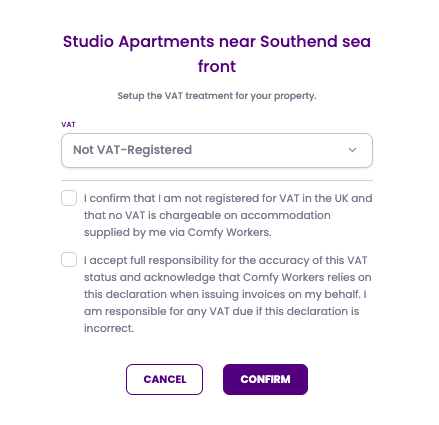
If you are not VAT registered then we do require you to confirm this within the portal.
Setting up your host profile
Your need to ensure that you set up the correct VAT rate for each of your properties. Once logged into the Comfy Workers portal, if you go your profile (top right corner), you will see a tab called Property VAT.
Here you need to select the correct VAT treatment for each property. This selection determines how VAT is applied to any future bookings at this property.
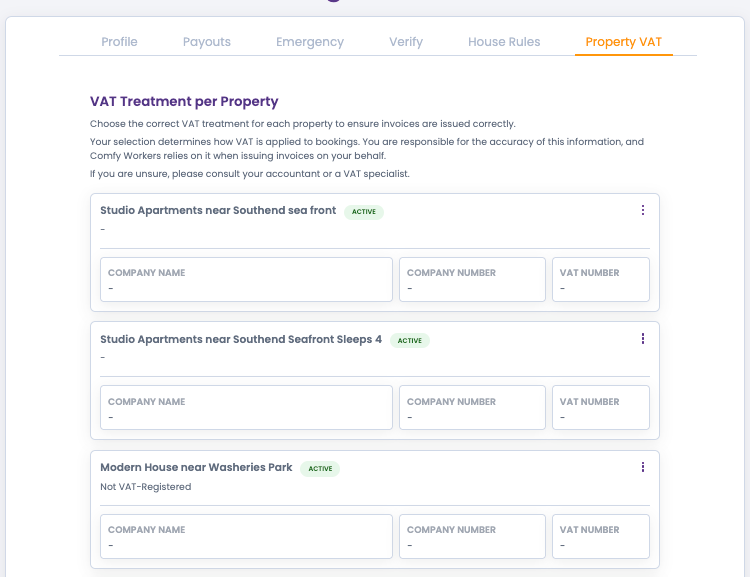
To edit, select the 3 dots on the right and click Edit, the below pop up will then display ready for you to complete :
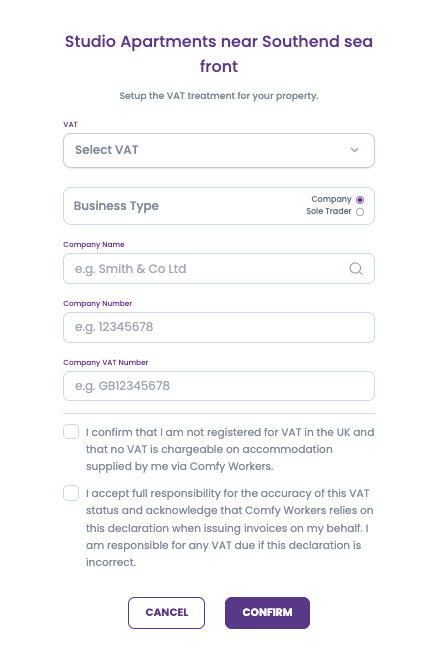
Selecting the appropriate VAT rate
Here you would select Not VAT registerted as shown below, ready and accept the approipriate statement and confirm.
It is your responsibility to ensure that you immediatelyu inform us of any changes to your VAT status.
What to do if I am becoming VAT registered in the near future?
If you are looking to become VAT registered in the near future, you do need to inform us as soon as possible.
If you have active bookings then we will need to look to adjust these accordingly from your registration date therefore we do need to be notified in advance so we can make the appropriate changes, This cannot be backdated.
Was this article helpful?
That’s Great!
Thank you for your feedback
Sorry! We couldn't be helpful
Thank you for your feedback
Feedback sent
We appreciate your effort and will try to fix the article