To ensure a smooth experience for both you and your guests, please follow the below check-in process carefully. These guidelines help us maintain consistency, avoid confusion, and deliver excellent service.
When do I need to upload check-in details?
Check-in details must be uploaded no later than 9:00 AM on the day of check in.
We kindly ask that this information is provided proactively, without the need to be prompted on the day. Timely submission is essential to ensure a smooth guest experience and effective support.
How do I upload check-in details?
Navigate to the bookings page in your host dashboard. Here it will show if you need to add check in details :

Click "Add check in details" to Upload all required check-in information and full address directly to the booking.
You are given clear guidance on what to and what not too include in your check in details :
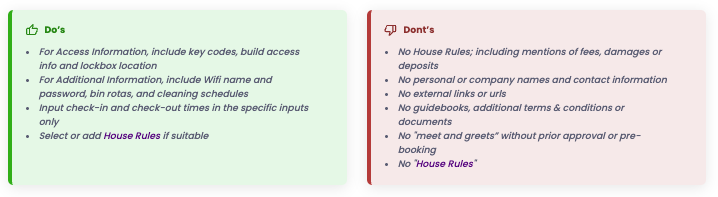 You need to complete all the below sections with as much details as possible while complying with the rules.
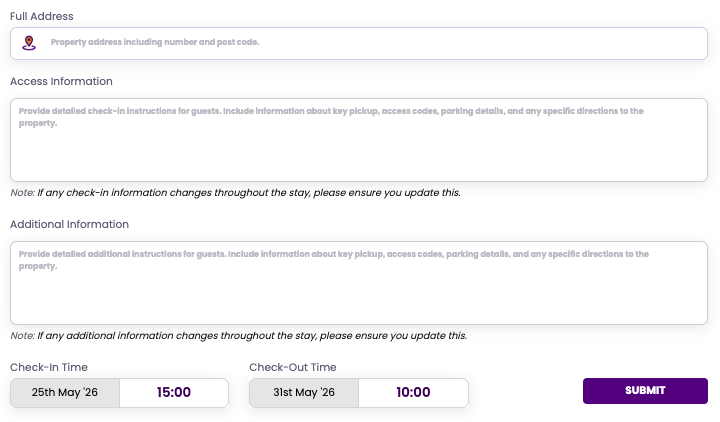
Full address : please ensure you provide the full address including postcode
Access Information : give clear guidance on how the guests access the property including :
Lockbox Location & Code – If using a lockbox, clearly state where it is and the code.
Apartment Entry Codes – For apartment buildings, supply all necessary key pad codes or instructions.
No Lockbox? – Explain exactly where the key can be found and how to access it (e.g., concierge pickup, hidden spot, etc)
If the property is difficult to locate or requires access through a particular door then please ensure this is all provided
Additional information : this is house specific information that guests would need during their stay including :
Wi-Fi details – Network name and password
Usage instructions – Optional guides for appliances, heating systems, or anything unique about the property
Cleaning & waste disposal scheduals
Parking info – If parking is available, clearly state:
-How many cars can be accommodated
- Whether parking is private or on-street
- Any instructions or permits needed
Check in and out times : these are automated but you can amended these if required.
What must I NOT include?
To maintain brand consistency and professionalism, the following are strictly prohibited in your check-in details:
❌ Your name, personal contact information, company name, or logo
❌ Mentions of “meet and greets” – We do not offer in-person check-ins. If you believe this is necessary, contact us directly before uploading to the portal.
❌ Links to any forms that the guest would be required to complete
❌ Guidebooks or documents containing any of the above forbidden elements
❌ Individual Terms and Conditions both you and the client sign up to our t&c's, plus you can add your generic house rules under your host profile.
By following these steps, you help us deliver a smooth, professional guest experience—while also following our t&c's. Thank you for your cooperation and for being part of our host community!
Was this article helpful?
That’s Great!
Thank you for your feedback
Sorry! We couldn't be helpful
Thank you for your feedback
Feedback sent
We appreciate your effort and will try to fix the article